On-Demand Color Labeling: Why the Epson ColorWorks CW-C4000 Is the Right Choice for Your Business
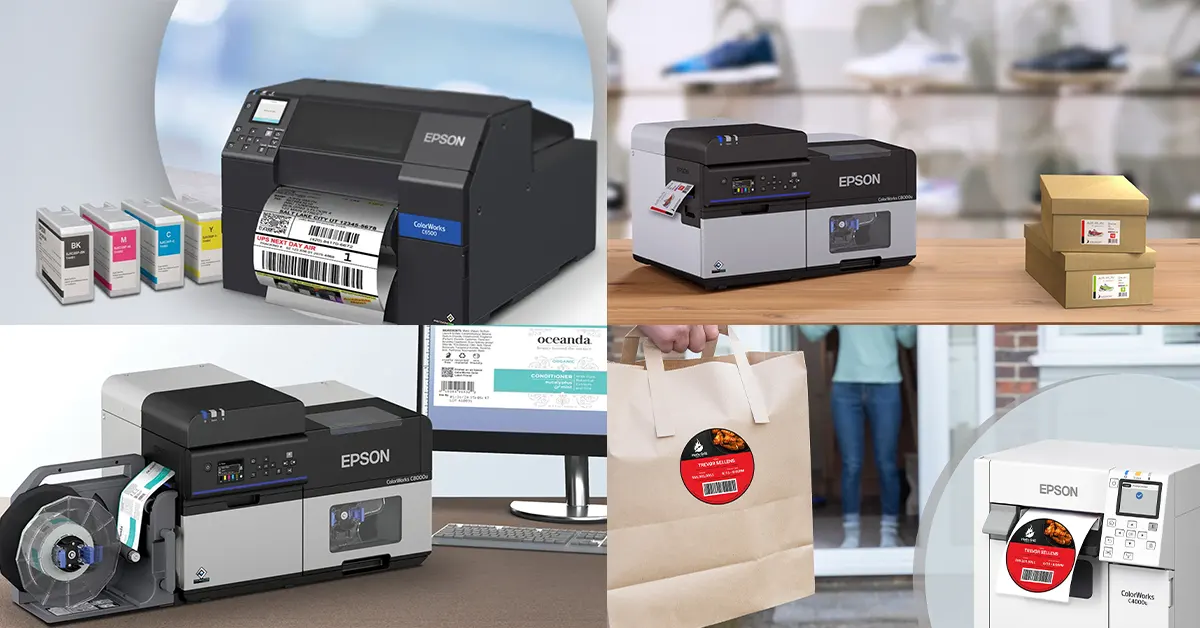
In today’s fast-moving markets, companies across food, healthcare, manufacturing, and logistics need flexible, durable, and visually sharp labeling — without depending on outsourced pre-printed rolls. Epson’s ColorWorks series delivers exactly that: vibrant, pigment-based color label printing on demand, from desktop to industrial scale.
At the foundation of this lineup stands the Epson ColorWorks CW-C4000 — a compact yet professional color label printer designed to give businesses in-house control over label production.
Epson ColorWorks CW-C4000: Compact Power for Professional Output
The CW-C4000 blends performance, precision, and affordability. It’s an ideal starting point for organizations printing color labels in low to medium volumes — without compromising on quality.
Key Features:
- PrecisionCore TFP printhead for sharp 1200 × 1200 dpi resolution
- Pigment-based inks with Gloss (BK) or Matte (MK) black options
- Print width up to 4.25? (108 mm)
- Multiple print modes balancing speed and detail
- Auto cutter included; optional Wi-Fi connectivity
- ZPL II and ESC/Label emulation for seamless integration
- Compact desktop footprint for small production or front-office use
The result: industrial-grade labels printed directly where and when you need them — perfect for small-batch runs, prototypes, or private-label packaging.
Print Modes: Balancing Speed and Quality
Mode |
Resolution |
Approx. Speed |
Max Speed |
300 × 600 dpi |
~3.9 in/s |
Speed |
600 × 600 dpi |
~2.7 in/s |
Normal |
600 × 600 dpi |
~1.9 in/s |
Quality |
600 × 1200 dpi |
~0.7 in/s |
Max Quality |
1200 × 1200 dpi |
~0.3 in/s |
Lower-resolution modes suit barcode or compliance labeling; higher-resolution modes produce vibrant, retail-ready packaging.
Gloss vs. Matte: Choosing the Right Black Ink
Epson offers two configurations of the CW-C4000:
- Gloss Black (BK): optimized for coated or glossy substrates — best for product packaging and retail labels.
- Matte Black (MK): designed for uncoated or matte materials — ideal for logistics and warehouse labeling.
Because the printer cannot switch ink types once initialized, match your typical media to the correct version before setup.
Comparison: Epson ColorWorks Lineup at a Glance
Feature |
||||
Print width |
4.25? |
4.25? |
8.34? |
8.34? |
Resolution |
1200 × 1200 dpi |
1200 × 1200 dpi |
1200 × 1200 dpi |
1200 × 1200 dpi |
Print speed |
Up to 4 in/s |
Up to 5 in/s |
Up to 5 in/s |
Faster, continuous output |
Ink type |
Pigment (Gloss / Matte) |
Pigment (Gloss / Matte) |
Pigment (Gloss / Matte) |
Pigment (High-capacity tanks) |
Duty cycle |
Low–medium volume |
Medium–high volume |
Medium–high volume |
Industrial, 24/7 operation |
Media handling |
Auto cutter |
Auto cutter / Peel-and-Present |
Auto cutter / Peel-and-Present |
Roll-to-roll, rewinder, peeler |
Connectivity |
USB / Ethernet / Wi-Fi |
USB / Ethernet / GPIO |
USB / Ethernet / GPIO |
USB / Ethernet / Industrial I/O |
Best for |
Small to mid-size businesses |
Production lines needing 4? labels |
Larger products needing 8? labels |
High-volume manufacturing & logistics |
Key advantage |
Compact, cost-effective |
Mid-range automation-ready |
Wide-format labeling |
Industrial speed and durability |
Industry Applications: Where Each Model Excels
1. Food & Beverage
- CW-C4000: Perfect for artisan producers, coffee roasters, and boutique packaging.
- CW-C6000 / CW-C6500: Excellent for mid-volume operations with multiple SKUs.
- CW-C8000: Ideal for full-scale bottling and packaging lines needing thousands of durable labels daily.
2. Chemical & Industrial
- CW-C4000: Handles smaller chemical containers and lab samples.
- CW-C6500: Prints wide GHS-compliant labels.
- CW-C8000: Excels at BS-5609-certified marine-grade labeling for drums and hazardous materials.
3. Healthcare & Pharmaceutical
- CW-C4000: Compact color labeling for specimens and medications.
- CW-C6000: Integrates into hospital labeling systems.
- CW-C8000: Suited for automated pharmaceutical packaging and serialization.
4. Retail & Logistics
- CW-C4000: Custom promotional and product labels.
- CW-C6500: Larger retail packaging or shelf labels.
- CW-C8000: Continuous pallet and shipping label production in warehouse environments.
5. Visitor Management & Events
- CW-C4000: Portable, on-demand visitor badges.
- CW-C6000: Kiosk integration for front-desk automation.
- CW-C8000: Centralized, high-volume event badge production.
Explore all options at IDSecurityOnline’s Visitor Badge Printers.
Implementation Tips
- Match ink to media — Gloss for coated, Matte for uncoated stock.
- Test label durability under expected conditions (chemical, UV, or moisture).
- Use Epson ICC color profiles for accurate, brand-consistent printing.
- Maintain consumables — ink, maintenance boxes, and cutter blades.
- Plan integration with labeling software or automation lines (especially for C6000 and C8000 models).
Call to Action: Build Your Scalable Label Printing Ecosystem
Whether you’re just starting out or managing industrial-scale operations, Epson’s ColorWorks lineup has a model that fits your workflow:
- Entry-Level: Epson ColorWorks CW-C4000 — compact, reliable, and affordable for small to mid-scale use.
- Mid-Range: CW-C6000 / CW-C6500 — powerful options for automated production and larger label formats.
- Advanced Industrial: Epson ColorWorks CW-C8000 — engineered for high-volume, continuous color label production.
- Enterprise & Events: Visitor Badge Printers — complete ID and labeling systems for access control and branding.
Visit IDSecurityOnline to compare models and consult with labeling experts to find the ideal Epson solution for your needs.
With Epson ColorWorks — from the C4000’s versatility to the C8000’s industrial strength — you can print brilliant, durable labels in-house, streamline production, and elevate your brand presentation.