ID Card Printers Selection Guide and Comparison: Making the Right Choice for Education, Enterprise, and Government
July 08 2025
Ever wondered if your ID card printer could be the unsung hero of your security framework?
Well, the landscape of identity management has changed significantly. Schools, corporations, and government agencies now have more advanced security and operational requirements than ever before.
The ID card printer, the hub of an effective identity management solution, remains a powerhouse that secures, verifies, and issues excellent credential printing.
However, with the abundance of ID card printer brands and models available, even the specialists are baffled seeking just the correct solution.
We'll discuss their features, applications for various settings, and essential factors to keep in mind in every decision?maker's preference. Whether you're equipping a university, implementing staff identification, or automating government ID production, this guide will help you make an informed, future?oriented purchase.
Why ID Card Printers Matter More Than Ever
ID cards now are more than a simple visual identifier—they are access-control devices, data-security tools, and regulatory?compliance instruments. Issuing student IDs, government IDs, or secure corporate badges, the right card printer is pivotal to your security infrastructure.
Education: Universities and schools rely on ID cards for attendance, library access, payments, and more.
Enterprise: Corporations depend on secure employee badges for door access, time tracking, and visitor management.
Government: Agencies need robust, tamper?resistant credentials for citizens and staff.
Poor printer choices lead to breakdowns, costly consumables, insecure cards, and compliance risks. An informed choice ensures reliability, efficiency, and peace of mind.
Types of ID Card Printers: Direct?to?Card vs. Retransfer
Before selecting a printer, understand the two core printing technologies:
Direct?to?Card (DTC) Printers: Print directly on the card surface. Faster and more affordable—ideal for basic, high?volume issuance.
Retransfer Printers: Print onto a clear film, then fuse it to the card, enabling over?the?edge printing, superior quality, and compatibility with uneven?surface cards.
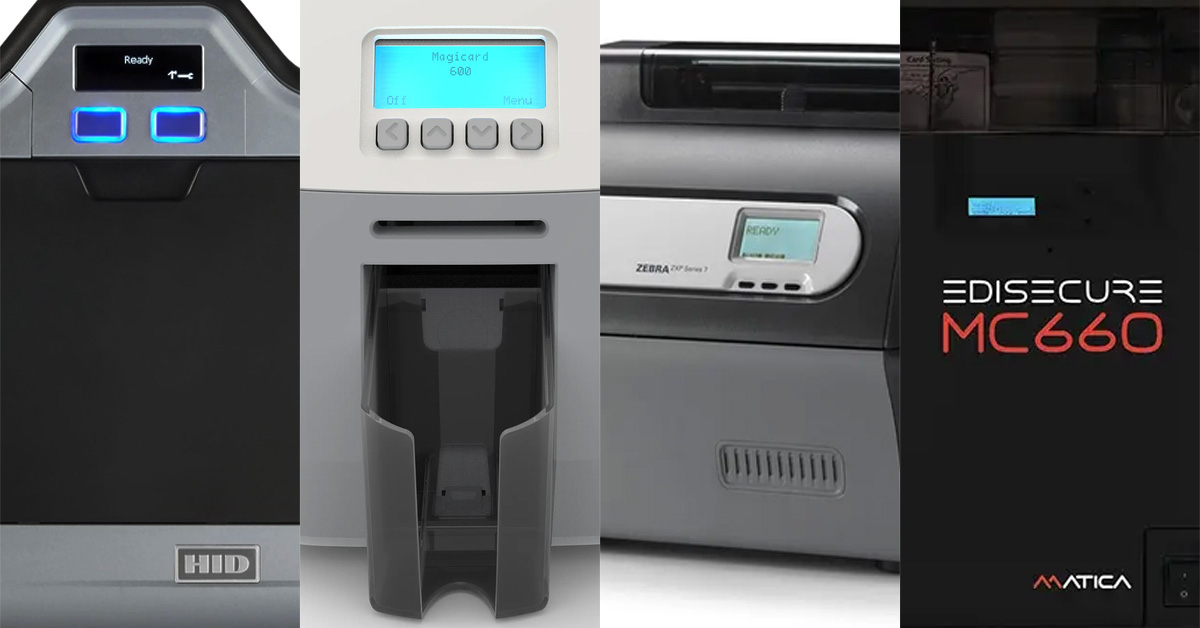
Overview: The Fargo HDP5000e is renowned for its reliability and versatility in high-security environments. This retransfer printer is designed for organizations that demand superior image quality, over-the-edge printing, and robust card durability. The modular design allows for easy upgrades, such as dual-sided printing, encoding, and lamination.
Ideal for:
Universities needing high-security student IDs.
Government agencies issuing citizen IDs or secure staff credentials.
Corporates requiring premium employee badges.
Key Features:
High-resolution 600 dpi printing
Over-the-edge, tamper-resistant output
Supports magstripe, contact, and contactless smart card encoding
Optional dual-sided printing and lamination
Excellent support for non-PVC cards
Drawbacks: Higher initial investment than basic DTC models; slightly slower print speed due to the retransfer process.
Overview: The Magicard 600 is a direct-to-card printer engineered for speed and security. Its standout feature is the built-in Digital Shredding™ capability, which ensures sensitive data is never left on the printer. Magicard’s HoloKote® watermark technology allows users to apply custom security images at no extra cost.
Ideal for:
K-12 schools, colleges, and organizations with moderate to high card issuance needs
Enterprises valuing rapid turnaround and inbuilt visual security
Key Features:
Up to 600 × 300 dpi print resolution
Prints full-color cards in under 20 seconds
Unique HoloKote® secure watermarking
Digital Shredding™ for data privacy compliance
Easy-to-use touch-screen interface
Drawbacks: Limited advanced lamination options compared to retransfer printers; not ideal for cards with embedded electronics.
Overview: The Zebra ZXP Series 7 is celebrated for its industrial-level throughput and exceptional print quality. Leveraging advanced DTC technology, it efficiently handles high-volume, high-demand environments such as large corporations and government agencies. Its modular design allows users to scale up capabilities as needs grow.
Ideal for:
High-throughput environments: government service counters, universities, or large corporations
Organizations needing frequent batch printing
Key Features:
Prints up to 300 full-color single-sided cards per hour
Overview: The Matica MC660 is a next-generation retransfer printer designed for environments where visual security, print durability, and flexibility are paramount. Known for its ultra-high 600 dpi resolution and support for a range of card materials, it excels in producing government-grade credentials and premium access cards.
Ideal for:
National ID and driver’s license programs
Corporate and university campuses seeking advanced security
Agencies printing on smart cards and non-standard substrates
Key Features:
600 dpi retransfer printing for photo-realistic images
Edge-to-edge, durable output on PVC, PET, and polycarbonate cards
Wide range of encoding modules (magstripe, smart card, RFID)
Optional inline lamination
Intuitive 4.3" color touch screen
Drawbacks: Premium pricing and advanced features may exceed basic requirements; lower card throughput compared to pure DTC models.
Please refer to IDSecurityOnline's product pages for the most up-to-date model details, warranty terms, and optional modules.
Cost of Ownership: Beyond the Sticker Price
When evaluating an ID card printer, consider both the initial investment and the lifetime cost. Consumables (ribbons, films, cleaning kits), service agreements, and spare parts can significantly affect your bottom line. Here’s what to weigh:
Ribbons and Retransfer Film: Retransfer printers require both ribbons and film, while DTC printers use only ribbons—though high-end ribbons for detailed security features can be costly.
Lamination Modules: If you require lamination for durability or security, check both the cost and the yield of laminate patches.
Cleaning Kits: Regular maintenance prevents downtime and extends the life of your printer. Set a maintenance schedule and budget for necessary supplies.
Service Agreements: Investing in extended warranties or onsite support can save you money and minimize downtime over the life of your printer.
Pro Tip: Always calculate the cost-per-card based on your projected card volume and preferred security features. This can vary significantly by printer and use case. Many organizations underestimate the savings from investing in a slightly more expensive printer with higher yield consumables.
Security, Compliance, and Future-Proofing
Data Security: Look for printers with built-in data shredding or erasure features (e.g., Magicard 600’s Digital Shredding™) to prevent data leakage.
Card Security Features: Watermarking (Magicard HoloKote®), UV printing, holographic overlays, and lamination all enhance security.
Physical Security: Many printers offer lockable hoppers or secure modules to prevent card and consumable theft.
Compliance: Government and regulated industries must adhere to standards like FIPS 201 for PIV cards or GDPR for data privacy. Choose printers that support compliant encoding and secure print workflows.
Upgrade Paths: As your security needs evolve, modular printers let you add lamination, dual-sided printing, or advanced encoding.
Why: Educational environments require quick issuance for new students, faculty, and visitors. Magicard 600 excels in speed and user-friendliness. For campuses with higher security needs (access control, smart cards), the Fargo HDP5000e offers flexible encoding and durable prints.
Other Considerations: Evaluate cloud-based card issuance solutions for distributed campuses and remote management.
Enterprise: Corporations, SMBs, and ContractorsBest Fit:
Why: Enterprises often have large-scale badge issuance needs and diverse card types. The ZXP Series 7 delivers on batch volume and modularity, while the Matica MC660 is ideal for premium access cards and high-security environments.
Other Considerations: Look for software integration with HR systems and Active Directory for seamless onboarding.
Government: Agencies, Citizen ID, and Regulated Sectors
Why: Government cards require maximum security, durability, and compliance. Both retransfer models offer photo-quality prints, over-the-edge coverage, and robust lamination/encoding options. Matica MC660, in particular, is favored for high-profile ID programs.
Other Considerations: Ensure compatibility with existing databases and consider printers with advanced encoding and anti-counterfeit features.
Final Thoughts and Next Steps
Selecting the right ID card printer is a strategic decision that impacts operational efficiency, security, and compliance for years to come. Here’s how to move forward:
Assess Your Volume and Needs: Map out your current and anticipated card issuance volumes, security requirements, and budget.
Engage with Experts: Consult with solution providers like IDSecurityOnline to review demos, get hands-on with different models, and secure the best support and warranty coverage.
Request a Free Consultation or Demo: Most vendors will provide a tailored walkthrough of hardware and software solutions.
Plan for the Future: Select a printer that can grow with your organization, whether that means modular upgrades, remote issuance, or enhanced security features.
For more guidance, check out our complete ID card printer buying guide, and stay updated on the latest industry trends by subscribing to our newsletter.
Any single item purchased on IDSecurityonline.com*
Get exclusive product deals, updates and the latest news. Privacy Policy.*Offer valid for first-time registrants only. Offer excludes accessories, Reference Series products and bundles. Valid in IDSecurityonline.com Only.
Thank you!
Check your email to get your 5% off promo code.
Not seeing IDSecurityonline emails? Check your junk/spam folder, and check the Social & Promotions tabs if using Gmail. Add info@idsecurityonline.com to your contacts to ensure future delivery.
Photo ID System selector
Supply Finder
Find ID Printer
gdfgdg
No-Hassle Return Policy
Not 100% satisfied with your order? Our
knowledgeable customer service team is here to assist you.
Call us at 800-897-7024
or email us at info@idsecurityonline.com.
UNOPENED/UNUSED ITEMS
To qualify for our Unopened/Unused return policy the product must be factory
sealed and unused.
A 20% restocking fee will be deducted from your credit.
Printer ribbons may be exchanged with no restocking fee, provided you receive
pre-authorization.
Software cannot be returned for any reason.
OPENED ITEMS
We are unable to accept any return of items that
have already been opened unless you have received pre-authorization from
us.
What
should I do if the order I received is incorrect (missing items or wrong
items)?
Products that are returned to us are subject to
a restocking fee of 20%. If your
shipment contains an unwanted item, you may return it within 30 days of
delivery for a refund of the item price minus any applicable restocking fees.
If there is an error on our part related to your
order, we will issue a credit for the total amount of your order, including
shipping charges.
Any items that you return to us must be in the
original manufacturer's packaging. We
suggest you keep the packaging (manuals, boxes, cables) for at least 30 days
after your purchase.
Low Price Guarantee
Our policy is
simple: we guarantee the lowest price on the items what we sell. Whether you
need a new ID card printer or supplies for your ID system, we will offer you
unbeatable deals on hundreds of items.
If you get a
lower price from another legit website or retailer, let us know and we will
beat it. Simply send us the quote via fax or email, or provide a URL within 7
days of purchase date. We will verify pricing and contact you to make sure that
you get the best deal on the items that you need.
If you have
questions, call your sales representative at 1-800-897-7024 to get a quote on
the ID card solution that you need.
At ID Security
Online, we strive to offer the best shopping experience for all our customers. Read
what our customers say about us and find out why ID Security Online is a reference in
superior customer service. Our team works hard every day to offer you
tremendous support and make sure that you build a successful ID card program.
Your satisfaction is our success!
FREE shipping on all orders over $100
We keep a large
inventory of all items in our warehouse in Manhattan, NY, which allows us to process
and ship your order very quickly. Most orders ship the same day!
A tracking number
will be emailed to you as soon as your order ships. You can also log in to your
account to check the status of your order.
Shipping times,
methods and costs will vary based on your location.
FREE shipping
ID Security Online
offers FREE UPS ground shipping on all orders over $100 in the United States.
Other shipping options
Expedited
shipping options such as 2-day delivery or overnight shipping are also
available on most items. Simply choose your preferred option when checking out
- shipping costs will vary based on your selection.
We also offer
international shipping. Contact us for more details.
Questions?
For more
information, call 1-800-897-7024, chat live with us, or email us at sales@idsecurityonline.com.
Free Quotes on ID Card Printer Supplies
Log in for pricing
Log in to your account
If you already have an account, please log in below.
Forgot your password? Request a password reset.
View all our guaranteed lowest pricing/see MAP pricing
Check order status, track your order, and view history
Special promotions
New Guest Sign Up
Thank you for your interest in subscribing to our blog via RSS. Simply provide your name and email address below.