ID Card Printing Blog
October 21 2012 |
Establish a Gift Card Program with ID Security Online
Gift cards are increasingly popular, especially around holiday season. From fashion boutiques, supermarkets, Home Depot, Macy’s to hair salons, gift and loyalty cards are offered in many businesses. Most retailers and chain stores have been using and heavily promoting them for the past few years. In fact, the largest selling single item for over 80% of the top 100 retailers in the United States is their gift card. Gift cards are seen to be mutually beneficial to both customers and retailers. The notion of products being offered at a certain discount when using a gift card gives shoppers the incentive to provide their business to the store owner. That is if the customers are satisfied with their purchases. It is practically a win-win situation. Now is the time for you, the small to medium sized retailer and independently owned restaurateur to grasp the opportunity and start your own program. It will look and work exactly like the big guys program, except yours will be designed with a price that you can surely afford.
October 04 2012 |
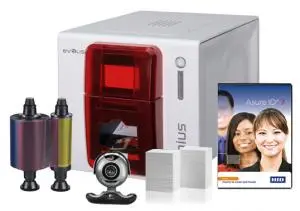
Evolis Card ID Printer and Supplies
ID Security Online had a wide selection of ID card printers and supplies manufactured by Evolis. You can now get off to a good start with an Evolis ID card system. It has everything you need in one simple package to be up and printing cards in minutes. We also offer all of the cards and accessories you will need to complete your plastic card application including PVC and proximity magnetic cards, lanyards, slot punches and more. Consider this your one stop shop for Evolis equipment and supplies. Evolisproducts include both warranty and non-warranty repairs and lifetime phone support on all printers purchased through ID Security Online. Unlike many online retailers, purchasing your Evolis products from us guarantees the best possible support for the life of your printer.
August 24 2012 |
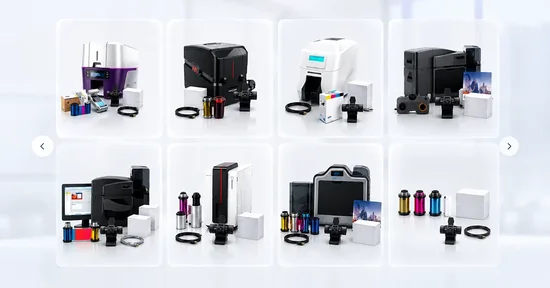
Photo ID System and Supplies
A photo ID system is an integral component of creating an effective ID program. In our modern high tech world, photo ID cards are found far and wide with many different uses. Driver's licenses or passports are no longer the main focus for photo ID. With the sophistication and convenience of a photo ID system, companies are able to easily integrate photo ID into their organizations and enjoy the benefits they have to offer.
August 12 2012 |
Zebra ZXP Series 8 Industries and Applications
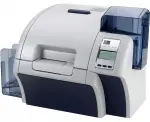
This retransfer card printer offers picturesque image quality, best-in-class throughput, a multitude of encoder options, and high reliability that minimizes maintenance. The ZXP Series 8 Printer includes ZMotif™ software development tools for easy integration with enterprise applications. Using innovative retransfer printing technology, the Zebra ZXP Series 8 delivers superior print resolution at the fastest speeds in its class for high-quality photo ID cards with images and graphics that look more like glossy magazine prints than ordinary ID photos. The printer’s modular design provides flexibility to add a variety of encoding options as needed.
Single or dual sided lamination is also available. This retransfer printer is ideal for printing on uneven card surfaces, such as smart cards, or for when the application calls for very high image quality or cards that are more durable and abrasion resistant.
August 05 2012 |
Single and Dual sided ID Cards Printers
Difference between a single-sided ID card printer and a dual-sided ID card printer?
A double sided printer will print on both sides of the ID card whereas a single sided printer will only print on one side of the ID card. A single sided printer is necessary for creating ID cards with limited cardholder information. It has a full color and monochrome printing capability. It offers magnetic stripe and smart card encoding options. You can choose direct-to-card or a stunning reverse transfer print technology. Printing ID cards from a single sided printer can be time consuming. Most card printer manufactures discourage the use of a single sided printer primarily that this printer tends to damage the sensitive print heads in the print cards.
August 05 2012 |
Laminate Photo ID Cards
Why would I need to laminate my photo ID cards?
Firstly, what is a laminated card? A laminated card is a full color plastic card with Matt or Gloss lamination. Matt lamination is a thin coating on a card used to smooth out the printings on the card. This coating provides a soft and silky satin sheen high quality finish resulting in a more sophisticated card. It also allows the card to be more water resistant. It also extends the durability of your card. Gloss lamination forms a protective coating over the print which makes it suitable for items such as menus, cards, brochures etc. Gloss lamination also gives your card a more professional look. These type of plastic cards are used for advertising a business, product, or a service. Lamination serves as a protection for your card. This process is beneficial to the cardholder that it prevents the fading and dye migration via sun exposure on your card. That way, you won't have to reprint your card frequently thus saving you supply costs and time. Holographic lamination increases the security of your cards therefore preventing identity theft or unauthorized duplication of your card. How are laminated cards produced? Multiple cards must be printed on a large sheet. Then they are fed through a laminating unit which provides a thin sheet of laminate either on both or one side of the card. This procedure traps the card in between. Heat is then applied to seal the lamination.
July 22 2012 |
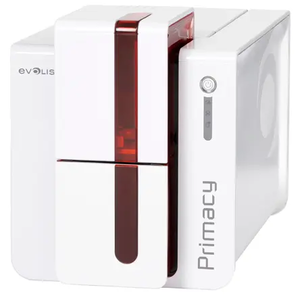
Announcing the Arrival of the Evolis Primacy!
ID Security Online is proud to
announce the arrival of the Evolis Primacy ID card printer!
The Primacy is an easy-to-use high-end printer and the ideal
solution for identification badges, payment cards, student cards and
transportation passes. Available in blue and red, single or double-sided and
with or without encoding technologies, the Primacy comes with USB and Ethernet
TCP/IP connectivity and boasts a pioneering 3-year manufacturer's warranty.
The Evolis Primacy prints a maximum of 210 cph (cards per
hour) in color and 850 cph in monochrome, includes a 250-card capacity color
ribbon cassette and has a 100-card capacity feeder and output hopper.
Further, the Primacy is user friendly, allowing the user to
check the amount of cards in the printer so that you can load more into the
front panel before the printing ends. It as well highly modular, allowing you
to install encoding options via the Evolis website.
And for the green thumbs, Evolis Primacy has received ENERGY STAR certification, complies with ErP directives and consumes an average of 5 times less than earlier printers.
June 14 2012 |
What are Duplex Printers and what are they Good For?
Duplex ID Card Printers, also commonly referred to as Dual-sided printers, are, as the name suggests, printers that are capable of printing images and text on both sides of a surface, usually of a piece of paper or plastic ID card.
Generally speaking there are two methods of duplex printing — a) printers which automatically flip over a piece of paper and print on the other side, and b) printers, usually high-volume printers designed with two engines, that print on both sides of the sheet of paper as once as it is feeds through the machine.
May 21 2012 |
Alternative Ways to Use ID Card Printing for Marketing Purposes
A high number of industries and fields utilize plastic card-printing
technology for an equally high number of purposes. Government buildings and
corporations print on plastic ID badges for access control and visitor management, schools use them as
identity cards for their staff and student body, and financial institutions use
them for credit cards.
However, this blog post will cover other, more out-of-the-box
ways that a standard ID card printer can be used for marketing purposes and to
promote your product.
Wide varieties of theme-specific information can be
incorporated onto a wallet-sized card. For example, if you run a construction
company or any business that involves calculating measurement conversions, such
as carpet sales, you can sell cards with unit conversion information printed on
them. 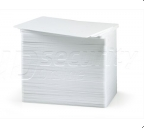 These can come in handy for customers who buy your products and need to
quickly convert units when placing rugs in their homes or workplace. Other
industries that can benefit from unit-conversion cards are bakeries, which
often require quick conversions for recipes.
These can come in handy for customers who buy your products and need to
quickly convert units when placing rugs in their homes or workplace. Other
industries that can benefit from unit-conversion cards are bakeries, which
often require quick conversions for recipes.
Public safety institutions, such as police and fire fighting
stations, hospitals and schools can print cards displaying emergency
information numbers and addresses on the front on back using dual-sided
printers.
And who says that business cards need to be limited to being
printed on paper cards? Plastic ID cards can contain all the information that a
traditional paper business card displays, but are more durable. This can as
well include restaurants with hours of operation, web site address to view a
menu, and phone number for delivery.
Coupons as well can be printed on plastic cards versus the standard
paper, which can be torn. Further, such cards can be programmed to be used
repeatedly.
Thinking outside of the box when it comes to alternative printer uses can help you advance your marketing strategy, and the technology already exists!
April 29 2012 |
Retransfer Card Printers
Retransfer Card Printers, such as the ZebraZXP Series 8 are printers that use heat and pressure in order to create a permanent image on a surface. In contrast to regular printers, which are used primarily for variant paper surfaces, retransfer printers are also used to print images on plastic surfaces, such as CD’s, although ID cards are among the most popular items that utilize retransfer printing.
How does Retransfer Printing Work?
Retransfer printing utilizes a two-step process. The first step is to print the image backwards onto the underside, or substrate, of a thin, transparent retransfer film. The second step is to place this film onto the item being printed on and to create an irremovable and identical image on the surface of the ID card or CD. Retransfer printing as well allows you to print images on a variety of variously shaped surfaces, such as smart cards.
No White Border around Image
Standard DTC, or direct-to-card printing, unavoidably creates a small white border of approximately 1/32nd of an inch around the perimeter of the card. While in some cases this border is desired, in some cases an image that is precisely flush with the edge of the card is preferred. Retransfer printing technology allows for the creation of images that extend to the end of the card. In order to accomplish this, the retransfer film must be slightly larger than the surface being printed on, such as the industry CR-80 PVC ID card.
Lifespan
There is another notable difference between retransfer printing and DTC printing. DTC printing requires that the printhead comes into continual contact with surface, on the order of thousands of cards per month, which gradually wears it down. The retransfer process extends the printhead lifespan by printing the image on the flimsy laminate film instead, thereby avoiding the wear-and-tear that occurs during DTC printing.
February 12 2012 |
What is a Printer Ribbon?
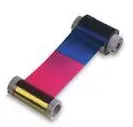
A printer ribbon is the part of the printer that administers the image onto the surface being printed on and there are two main types of ribbons: color and monochrome.
December 25 2011 |
The Usefulness of Customer Loyalty Cards
For most business, having a customer come in once simply isn’t enough. Any business savvy person will tell you that the key to running a successful company is in the amount of customers you have alone, but in the willingness of those customers to come back to you time after time and not go to your competitors for the same, or similar, products. But how do you acquire an efficient network of loyal customers? Unless they are given some sort of incentive, most costumers won’t give a second thought before going to a different company if it’s more convenient for them. Customer loyalty cards are a great way to give your company the extra edge that will drive clients away from the doors of your competition in favor of doing business with you. Best of all, you can design and print these cards right from your office. Here are just some key benefits to take into consideration when deciding if taking the initiative to print customer loyalty cards will help your business:
- First time buyers will be more inclined to return to you after their initial purchase- Giving your clients a discount or establishing a rewards system makes it more financially logical for your customers to return to you.
- Get customers to remember you- Many customers tend to forget contact information for a business they seldom work with or have visited just once. A customer loyalty card with your businesses’ contact information can double as a more durable business card.
- Returning customers will be encouraged to spend more than they normally would- If your company offers a rewards system through the use of loyalty cards, customers will be inclined to spend more with the goal of attaining those rewards.
- Improve your inventory- customer loyalty cards can give you a better sense of what products your customers are buying. This provides you with useful data when it comes to deciding which product you need to stock up on more and which to cut back on.
If you already own an ID badge printer, you don’t even have to purchase any additional supplies. ID badge printers, like the HDP5000 from Fargo, can be used to printer your very own customer loyalty badges right from your office! If you believe your business would benefit from customer loyalty cards, or simply want to find out more about how to begin implementing a customer loyalty card program for your business, give us a call at 800-897-7024.
November 22 2011 |
How to Use the Evolis ID Card Printer Series for your ID Badge Needs
Evolis is a printer manufacturer that makes printers used in printing ID badges of different types. Some of the different types of cards you can print are standard ID cards, driver’s licenses, bank cards and access badges and the like. A badge typically holds information about its owner, such as name, a photograph and perhaps statistical information such as height, weight and hair color, etc. The purpose of an ID badge is to identify the individual.
PVC Cards
The types of cards used are the standard type of cards used by most printer manufacturers. These cards are known as PVC (yes, the same PVC used for piping), but are more commonly known as plastic cards. Since they are smooth to the touch, PVC Cards require printing via a method known as thermal transfer printing, which uses a printer part known as a ribbon to apply either a colored or monochrome layer. Contrast this with your standard inkjet printers, which place the ink directly on the page. Thermal printing is necessary since the heating process causes the ink to remain glued to the surface, which is not an issue with printing on paper.
When printing in color, the heat turns the ink layer into gas that reverts to its original state on the card’s surface, a process known as sublimation, or dye sublimation. Evolis printers can print in both monochrome and color.
Bar Code Application
Bar codes are perhaps the most basic feature of plastic cards and are used in many places, such as in stores that sell merchandise branded with bar codes. It is therefore not limited only to cards, but to a variety of plastic surfaces that require bar code identification. A bar code works by creating highly distinct black and white areas that are read by a photosensitive electronic scanner. When the card is passed under the light emitted from the scanner, the scanner detects which light is absorbed by the black areas and which is reflected by the white areas, a pattern which registers as a product or item. We’ve all been in line at the grocery store only to find that the cashier has to scan our item over and over again while people behind us are getting impatient. A scanner has a hard time reading a bar code when the lines are not printed sharply or evenly.
Rewritable Printing
Rewritable printing is to printers what rewritable CD’s are to CD burners. Any images printed on a rewritable card can be erased by being exposed to heat (230-320° F or 110-160° C). A typical PVC card can go through this process usually up to 500 times.
Lamination
Printing lamination is similar to the standard form of printing, whereby a material such as paper is covered in a protective plastic sheath. In printing, specifically in ID card printing, lamination is used in order protect card images from destruction, either accidental or deliberate. Such damage renders a card used for identification useless, or worst, if a card with an unrecognizable image is lost and found by somebody else, it can lead to identity theft. Evolis offers cards of this type in order to prevent against the types of forgery associated with damaged cards.
Holograms
It is also possible to apply holographic images to PVC cards. Cards with images are typically used by institutions that seek to avoid counterfeiting and forgery, such as banks or facilities that require an age limit for access. Holographic images cannot be duplicated with a standard Xerox machine, scanner or standard inkjet printer, which is why certain organizations opt to use them.
Magnetic Encoding
Magnetic encoding is a black stripe placed on the back of a card, usually bank cards. The particles in the magnetic encoding stripe hold binary information (1’s and 0’s) that a scanner, or reader, encodes when swiped. Evolis makes magnetic encoders that are able to create the magnetic stripes used by financial institutions.
Contact Cards or Smart Cards
Contact cards, also known as Smart Cards, are plastic cards fitted in an internal chip that can hold more than 100 times the amount of data that a magnetic stripe can hold. They are swiped much like a magnetic encoding card and also rewritable.
Contactless Cards
A contactless card is a card that holds information read through the transfer of microwave frequencies from a chip to the laminated plastic card. This mechanization means that the card doesn’t need to be swiped, but just passed nearby the scanning device (between 3-10 cm) and allows for quicker and more efficient access. Contactless cards can be used for a variety of applications, depending on the card model, and is common for access security, data storage and encryption.
November 06 2011 |
Fargo DTC4000 Information and Specifications
Fargo’s line of single and dual-sided card printers/encoders are each designed with a specific set of tasks in mind. HID/Fargo designed this printer specifically for large organizations with more stringent security and volume requirements than were available with the DTC1000 printer. But the goal was not to cloud intuitive use, compatibility and flexibility with indecipherable technological advance and complexity, but rather to find a way where both ends could be met in one easy-to-use and advanced printer/encoder. And like other Fargo models, the DTC4000 represents an advanced generation of high quality specialization printers that efficiently carries out its tasks. Today’s consumer demands a high level of compatibility and so the DTC4000 serves on these expectations as a highly intuitive product requiring very little operational training. HID/Fargo sought to design a printer as simple as it was sophisticated. The DTC4000 is field upgradable, small and light, contains encoding options, is compatible with professional environments, has advanced security and encoding options.
Field Upgradability and Configurable Settings
The DTC4000 is field upgradeable and customizable in accordance with a breadth of complex projects and uses. Using the field upgradability feature you can toggle between single and dual-sided printing and adding magnetic stripe, HID proximity, iClass contactless and/or contact chip encoding functionality. It is also Ethernet compatible, which was optional with the DTC400e, DTC550, Persona C30e (now discontinued) and as a standard accessory with the DTC5000. Configuring the printer is very easy and completed via the standard window and tab combination. Once your printer is installed, you can simply open the Configuration Tab and select whether you want the printer set on Dual-Sided, Magnetic Encoder, Dual-input Card Hopper, or Input/Output Card Hopper, which, by the way, is a same-side card hopper. These advanced flexibility options mean that this model can serve a wide variety of industries and job descriptions, such as hospitals, schools, businesses, banks and legal and administrative institutions, not to mention the high tech industry.
Professional Compatibility
Its physical design is also ideally-oriented for office and institutional use, with dimensions making it compatible with most professional environments. The weight and dimensional specs of the single-sided printer are 8 pounds at 9.8 inches high, 17.6 inches wide and 9.2 inches deep, and the specs of the dual-sided printer are 10 pounds at 9.8 inches high, 18.2 inches wide and 9.2 inches deep, making it not much larger than a standard shoebox. At the same time, it comes with an optional same-side input/output card hopper accessory, which means that the DTC4000 can be inconspicuously placed in most places in your office.
Location
As long we’re discussing location, it is important to consider where placing your printer as there are some guidelines to consider. Like with other printers and most electrical machines, the printer should be placed in a location with sufficient air circulation, which prevents internal heat build-up. Keep in mind that although the printer is small, you should allow for enough room for people to walk in front of it when its covers have been opened. You should also avoid installing the printer in areas near heat sources such as air ducts or in front of a window where the printer will be exposed to direct sunlight. Also avoid placing it in areas of high dust accumulation or mechanical vibration. If the printer is brought directly from a cold to a warm, or a dry to a moist location, there may occur a build-up of moisture condensation, which can negatively affect the print quality. In such a case, unplug the printer and leave it in a dry room for several hours, which will cause the moisture to evaporate.
Security Options
The DTC4000 comes with a sophisticated security encoding system that includes password protection to allow only select and approved administrators to carry out print jobs and encode security badges and cards. It also comes with an Ultraviolet layer for an increased security level regarding the physical card once printed. This fluorescent panel works by producing grayscale holographic text and images that are only displayed when the card is placed under UV light and are excellent fraud-battling measures. This is part of what makes this printer appropriate for banks, other financial and governmental institutions. The DTC4000 can also be password protected at the printer so only approved operators can print and encode plastic security cards and badges.
Ribbons
A feature available only with the DTC4000 is the option to select the fluorescent panel ribbon. Mentioned briefly in the previous paragraph, the The YMCFKO (yellow, magenta, cyan, fluorescing, resin black)/YMCFKOK Ribbon is an cost-effective method to customize the security measures of your photo identification cards. You are even able to create a custom image to appear as a holograph on your cards.
The design of Fargo card printers necessitates highly specific supplies, such as ribbons, to function correctly, such as the one-piece disposable ribbon cartridge load system used by both the Fargo DTC1000 and 4000 models. While you are able to use supplies belonging to other printer brands, it is highly recommended to use only Fargo certified supplies, which will prolong the life of your printer and maximize its print quality. Using supplies belonging to other brands as well nullifies your warranty in locations not prohibited by law. Other warnings can be found in the DTC4000 User Guide.
Encoding Options
The encoding options and ISO standards, as discussed previously regarding field upgradability, can be changed easily in the traditional window and tab format, such as when printing a document. Encoding options include a 125 kHz (HID Prox) reader, a 13.56 MHz, compatible with iCLASS®, MIFARE®, ISO 14443 A/B, ISO 15693, a read/write encoder, in Contact Smart Code Encoder, ISO Magnetic Stripe Encoding and dual high- and low-coercivity. More information is available in DTC4000 User Guide.
August 25 2011 |
How do I Clean my ID Card Printer?
We want your ID printer to run smoothly and effectively for as many years as possible. Buying a new ID card printer is expensive, repairing one can drain your pocket just as much. While most ID card printers come with a warranty, there are certain conditions to that warranty that you have to keep in mind. An ID card printer is just like any other mechanical device; it must be treated with care and regularly maintained. You wouldn’t drive your car for 10 years without taking it to a mechanic, would you? Routine maintenance is just as important with your ID card printer as it is with your car! Both machines have frequently mobile parts that can collect dust, dirt and grime. When an ID card printer is neglected, these foreign agents can cause your ribbons to break and render your ID cards useless. To get the maximum amount of usage from your ID card printer, you have to upkeep it with the same regularity and care that you would with a car or any other mechanical device with constantly moving parts. Here are some tips to help your ID card printer run smoothly and efficiently for many years.
Remove Your Jewelry Before Changing Your ID Card Printer Ribbon
This is very important as jewelry can scratch the printhead or any other inner components of your printer. This type of damage is not covered under the warranty and replacing the components will be solely your responsibility. Make sure to remove all jewelry that might come into contact with the machine (rings, watches, bracelets, etc.) prior to performing any maintenance.
Clean Your ID Card Printer Regularly
All ID card printer models now have card counters that are used to trigger several actions by the operator. If you do not perform the required cleanings, you run the risk of voiding your warranty. We suggest cleaning your ID card printer after every ribbon change
Buy a Cleaning Kit
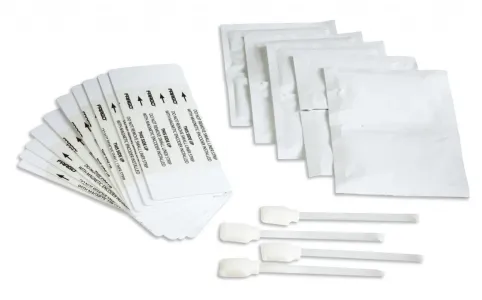
Cleaning kits are an inexpensive way to maintain your ID card printer. These ID card printer cleaning kits include everything you need for routine upkeep of your machine, reducing the risk of a part breaking. ID Security Online offers a vast array of cleaning kits for most ID card printer models that cost no more than a couple of dollars per cleaning (certainly less expensive than replacing a machine).
Contact us at IDSecurityOnline today at (800) 897 7024 to discuss your card printing needs.
August 25 2011 |
Direct-to-Card and Retransfer Card Printers – the Difference
Human beings don’t live forever, and neither do card printers. And the reality is that regardless of the quality (and the price), every card printer has its day. Although a typical card printer comes with a standard warranty of 2 years on parts and labor, there is some variation, as some come with a warranty of 3 years. However, retransfer printers come with a lifetime warranty on parts and labor, including the print head. The reason for this is that retransfer printers utilize a unique printing method that functionally eliminates the need to factor in the cost of a replacement print head.
What’s the difference, you ask, between a direct-to-card printer (DTC) and a retransfer printer? During the DTC printing process the print head comes into repeated contact with rigid cards. Typically-speaking, a company printer can print on the order of thousands of cards per month, gradually wearing down the print head. The retransfer method avoids this deterioration by retransferring the image onto the retransfer film, hence its name, thereby significantly extending its lifespan. What’s more is that print heads cost between approximately $500-$900 and is considered to be a commonly-replaced part in DTC printing. Using a retransfer card printer also often translates into higher return on investment, which means that you can save your company a good deal of heartache and money.
There’s also the question of to replace or not to replace. Many factors can affect this decision, such as the decreased cost of ID card printers and technological improvements that necessitate system upgrades. It’s also noteworthy that a printer evaluation fee, minus the cost for the actual repair, figures in the ballpark of $120 or more. Not exactly a walk in the park itself, though tolerable.
Frequently Asked Questions
Choosing a Printer
Finding the optimal card printer for your company can be an easy, and even enjoyable, process. ID Security Online’s experts will listen to your needs and help you find the best printer for your organization or business.
Choosing an ID Software
ID Security Online’s consultation team also helps you determine the best software system for your application, walking you through the installation process and teaching you how to operate it on your own.
Troubleshooting
Our technical support group will help you deal with any printing system issues so you can experience the best possible usage from your card printer.
Contact us at IDSecurityOnline today at (800) 897 7024 to discuss your card printing needs.
February 24 2011 |
Planning to buy an ID card printer?
If you are planning to buy an ID card printer for your company, you will be surprised at the vast array of choices available in the market today. If you are not an ID card printing expert, your head will spin with the number of brands and types that you have to browse through before you can find the perfect choice. But if you equip yourself with sufficient knowledge about buying an ID card printer before you go out to shop for one in the market, it would be easier for you to narrow down your options and make an informed decision. Here are some of the things that you need to think about.
Color or Monochrome
In terms of color, there are two kind of ID card printer. One can print full color while the other can only print in monochrome. The advantage of the former is that it produces vibrant images and attractive designs. However, monochrome is quicker and more cost effective. It only takes about 5 seconds per each card and since you’ll only be using a single panel print, the cost is much lower than full color printing. Your choice between the two primarily depends on the nature of your company, budget, and preference. For example, if your company is a web/graphic design or animation company, it makes sense to invest on a full color card printer since the ID should be a reflection of what a company does.
Single or Dual Side Printing
Another consideration you have to make is whether you are going to print on the front side or on both sides. As the name implies, the single type printer will print only on the front side of the card. If you are definite that the IDs to be printed for your company will only require print on the front side, this can be the ideal option for you. The dual sided printer, meanwhile, has the advantage of printing on both sides of the ID. Obviously, this one is more expensive than the single side printer. Aside from the more expensive upfront cost, the dual sided ribbon used for this kind of printer is also pricier.
Quantity of Cards
You should also ask yourself how many ID cards you plan to be printed each year. If you are a small business, you would only need a few cards a month. But for a larger company, you need to invest on specialized printers that feature high capacity printing of cards. Printer that can accommodate a bigger quantity is more expensive but the investment is worth it.
Printer Brand
When it comes to brand, there is a wide variety of names on card printer manufacturers that you will get to know about when you go out into the market. Some of the well-known brands include Fargo, Zebra, Evolis, DataCard, and Magicard
ID Software
Aside from the printer itself, you should also consider planning your purchase if you intend to buy ID card software. This way, you can be sure that you will be able to make the right buying decision. Entry level ID card software is inexpensive but limited in its capabilities, for instance some software limits the number of data fields per card design. Other software will only allow a limited amount of data records, be aware you may have to up-grade to the next level at additional cost soon after your purchase.
If you plan to “network” the software and place it on multiple computers you will have to purchase a higher level of the software plus additional “site licenses” for each additional user.
The bottom line is to do your homework but do not hesitate to reach out to an expert in the field, most manufacturers will recommend a “partner” in your area that should ask the appropriate questions I listed above and guide you to the correct choices.


- 37 West 26th St 10th Floor New York, NY 10010 U.S.A.
- sales@idsecurityonline.com
- 800-897-7024
- 1 (888) 239 4912
2009-2026 © IDSecurityonline.com. All rights reserved.