Photo ID Systems
IDSecurityOnline is a leading provider of ID card solutions


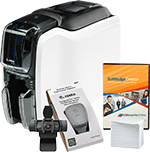
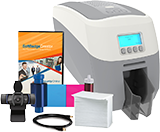
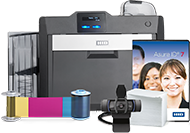
Get ready to issue professional ID Cards and Badges with our unique Photo ID Systems.
- Comprehensive bundles with an ID Card Printer, camera and supplies.
- Large selection of single-sided, duplex and laminating photo ID Systems.
- Shop our ID Systems by industry to find the right solution for your needs.
- Price match guarantee, toll-free customer support and free shipping right to your door.
- Call us today at 1-800-897-7024 for a FREE consultation with an ID expert.
Shop Photo ID System By Type:



 Fargo
Fargo
 Magicard
 Zebra
Zebra
 Evolis
 Datacard
 Nisca
Nisca IDP
IDPFeatured Products
%26NAME%3Dproducts%26NUMONPAGE%3D4%26ITEMSINAROW%3D4%26TR_OPEN_CONTENT%3D%3Cdiv+class%3Drow%3E%26TR_CLOSE_CONTENT%3D%3C%2Fdiv%3E%26CAT_TAG%3Dphoto-id-systems%26NEED_COMMENTS%3D0%26DEFAULT_SORTING%3D+a.%60PRICE%60%26ENTIRE_LIST_TEMPLATE%3Dproducts_list_list2019-nonav.html%26ITEM_TEMPLATE%3Dproducts_list_item2019.html%26IS_FEATURED%3D1%26COLMD%3D12%26COLLG%3D3WHAT'S INCLUDED IN YOUR PHOTO ID SYSTEMS?
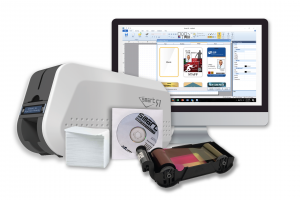
All our Photo ID Systems come with everything that you need to issue all your cards and badges on demand.
Each photo ID System includes:
- A reliable ID Card Printer from a leading brand
- Easy-to-integrate ID Card Software to design easily all your cards
- A color ribbon for stunning graphics
- Overlaminates for laminating photo ID systems
- Premium blank plastic cards
- A camera to capture high-quality photo IDs
- USB cable
With our Photo ID Systems, you won't have to worry about choosing the wrong ribbon or software for your applications. It even gets better since buying each item separately would cost more than our bundles.
You also get toll-free customer support to get answers to all your questions whenever you need it.
HOW DO I CHOOSE THE RIGHT PHOTO ID SYSTEM?
Our line of Photo ID Systems has been designed to answer all ID needs affordably and securely. To find the right solution for you, consider the following questions:
Do you need to print on one side or both sides of your cards?
If you are planning to print on one side of a card, choose a single-sided Photo ID System. Compact and easy-to-use, single-sided Photo ID Systems are perfect to print basic visual IDs. Print your logo, the cardholder's name and picture, and even a barcode.
If you need to print on both sides, go for a Duplex Photo ID System. Duplex or dual-sided photo ID systems will automatically flip your cards to print on both sides in one pass. This option allows you to include more information to your cards such as a schedule for student IDs or contact information for membership cards.
How many cards will you print per year?
To print up to a few hundred cards a year, choose a Standard Photo ID System. If the amount of cards that you need to print is much higher, look for mid-level or enterprise photo ID systems as they are more suited for high volumes. A key component is the card feeder: when entry-level printers offer manual feeding or a 50-card input hopper, high-volume printers can include a feeder with a capacity of a few hundreds of cards!
Do you need highly-secure cards?
To reduce the risk of counterfeiting or tampering, go with laminated cards. Adding a clear or custom layer of protection to your cards will help you create highly-secure badges. Laminating photo ID systems offer lamination on one side or both sides of the cards.
Do you need to print cards in high definition?
Some of our enterprise photo ID systems come with a retransfer card printer. Retransfer ID card printers use a different printing process to print ID cards. The card images are printed onto a clear film called retransfer film that is then fused onto the surface of the card. This process allows you to print over the edge of your cards, which means that you won't have a white border around your printed cards. The result is stunning: superb, vivid colors for high-quality badges.
WHICH TYPE OF ID CARDS CAN I PRINT?
All our Photo ID Systems will allow you to print high-quality badges for all your applications. Here are a few examples of the most popular uses for ID cards.
- Identification: issue professional ID cards for your employees, students or visitors and identify at a glance who belongs in your facility.
- Access control: keep track of who enters and exits your premises with access control badges to secure your company, school or building.
- Time & attendance: track your employees, visitors or students with secure badges.
- Loyalty cards: boost your sales, create value for your existing customers and attract new clients with professional loyalty cards.
- Membership cards: print stunning membership cards to offer special incentives to your customers and facilitate access to your facility.
- Payment cards: Issue payment cards, gift cards, or IDs with cashless payment options thanks to your ID card printer.
- Event passes: print professional badges for your exhibitors, visitors, and staff.